Book smarter.
Travel better.
Airlines bury the details that matter in tiny gray text. Our browser extensions highlight what matters — layover times, non-stop availability, connection quality — so risky stopovers can't hide and the best flights jump out.
The Problem
Airline booking sites bury the details that matter. Layover durations blend into tiny gray text on every flight card. Finding non-stop options means manually checking date after date. It's slow, easy to miss, and leads to booking mistakes.
Our Solution
Lightweight browser extensions that read the data already on the page and display it where it belongs. No accounts, no sign-ups, no data leaving your browser. Install once, and every flight search gets better — automatically.
Three tools. Two airlines. One goal.
Each extension solves a specific frustration in the flight booking process.
Amex Layover Display
Amex Travel shows layover times but they're easy to miss. This extension highlights every layover with green/yellow/red severity color so tight connections jump out and long stopovers flag before you book.
- Layover duration and airport shown on every card
- Color-coded: red for tight, amber for long
- Popup ranks all flights by shortest layover
- Works on round-trip, one-way, and multi-city
Non-Stop Flight Finder
Automatically scans multiple departure dates to find which days have non-stop flights available. Stop checking dates one at a time.
- Scan 7 to 60 dates in one click
- Shows cheapest non-stop price per date
- Click any result to jump back to that date
- Runs in background — close the popup anytime
United Layover Display
The same layover visibility, built for United Airlines. See connection times on every flight without expanding cards or doing mental math.
- Layover times injected into United search results
- Color-coded badges for short and long connections
- Ranked popup sidebar for quick comparison
- Click to scroll directly to any flight on the page
Up and running in 30 seconds
No accounts. No configuration. No learning curve.
Install the extension
Add it from the Chrome Web Store or Firefox Add-ons. One click, under 100KB, no permissions beyond the airline site.
Search for flights
Go to Amex Travel or United.com and search for flights like you normally would. The extension activates automatically.
See what was hidden
Layover times appear on every flight card. Non-stop availability shows across your date range. No extra clicks needed.
See the difference
Real screenshots from real flight searches.
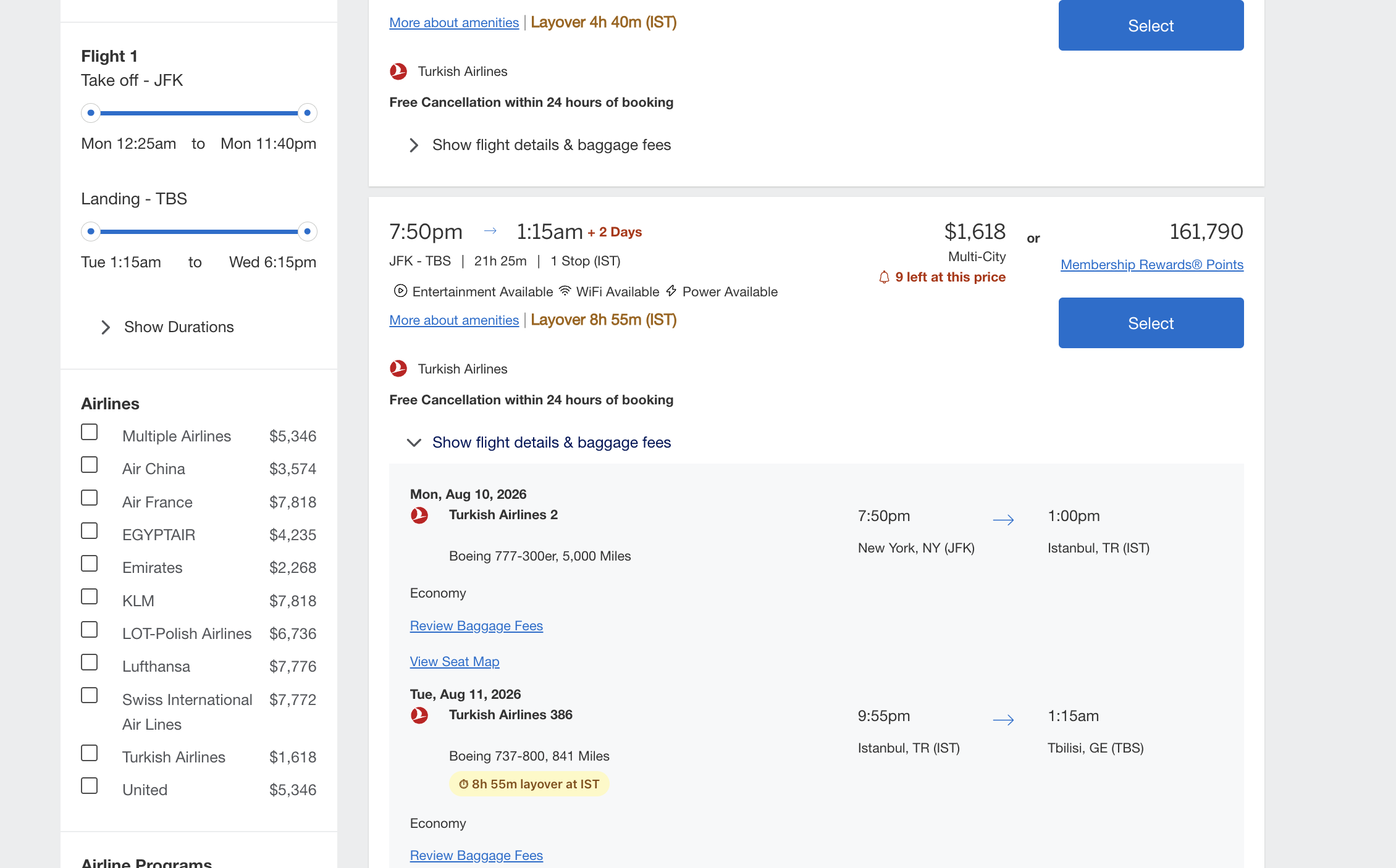
Layovers visible at a glance
Every connecting flight shows its layover duration and airport code right on the card. No need to expand details or calculate times yourself. Short connections are flagged in red so you never accidentally book a 45-minute international transfer.
- Works on one-stop, two-stop, and three-stop itineraries
- Layover duration and airport code shown inline
- Color-coded so tight connections stand out
- Round-trip, multi-city, and Review Your Trip pages
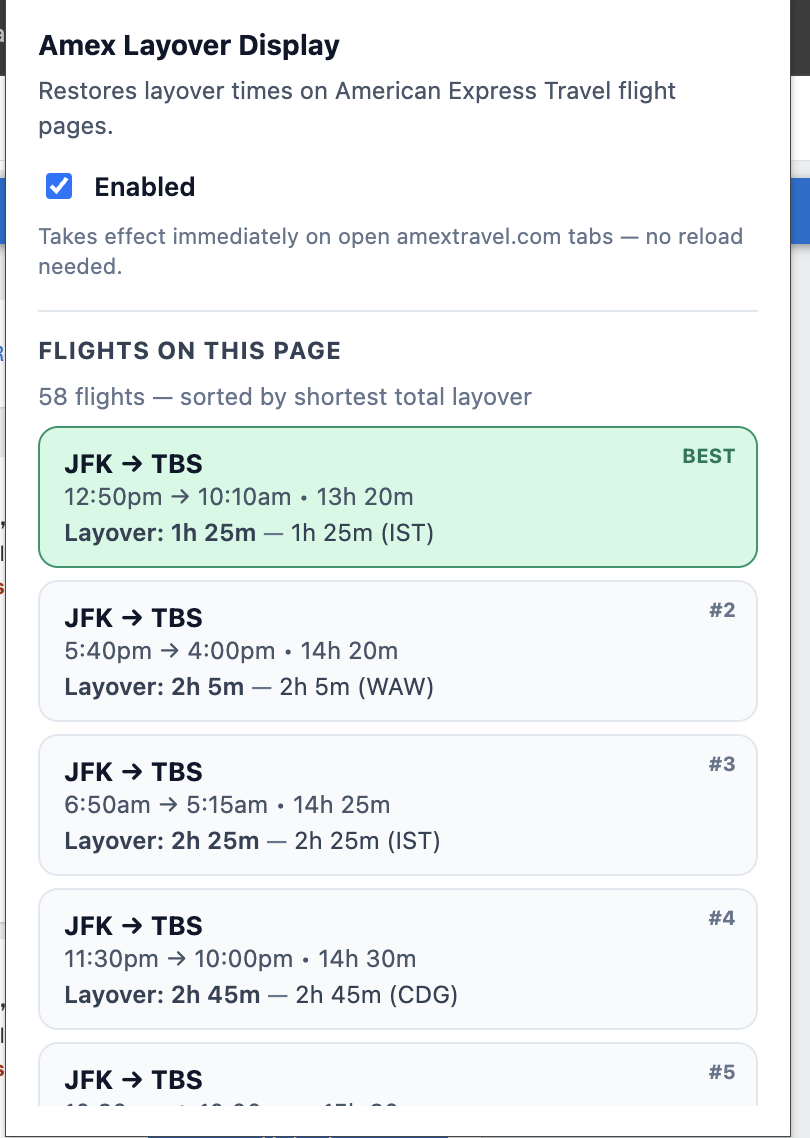
Every flight, ranked
The extension popup gives you a ranked list of every itinerary on the page, sorted by shortest total layover. The best options surface instantly. Click any flight to scroll directly to its card.
- Sorted by total connection time — best first
- Click to jump to any flight on the page
- Non-stop flights automatically rank highest
- Toggle the extension on or off per session
A considered approach
Here's how these extensions are built and what that means for you in practice.
Local-only processing
The extensions process flight data inside your browser. They don't send your searches to our servers and don't include third-party analytics or trackers.
Free to use
The extensions are currently offered free of charge, with no subscriptions, premium tiers, or upgrade prompts. Any future changes to this will be announced in advance.
Minimal footprint
Each extension requests only the permissions required to read the airline pages it operates on. Permissions are listed on every Chrome Web Store and Firefox Add-ons listing for review before install.
No account required
There is no sign-up or configuration step. Each extension activates only on its supported airline pages and remains inactive elsewhere.
Chrome and Firefox
Separate builds are maintained for Chrome (Manifest V3) and Firefox (WebExtension APIs). Compatibility with other Chromium-based browsers is not officially supported.
Direct contact
Bug reports and feature requests can be submitted through the support page. Reports are reviewed and prioritized based on impact and available time; response times are not guaranteed.
Ready to book smarter?
Install any of our extensions for free and see what your airline has been hiding. No sign-up required.